
How to automate ecommerce orders
Order automation is not one integration. It is a chain of decisions from payment capture to accounting entry, each of which can run without a human. This guide maps the chain and where to automate first.
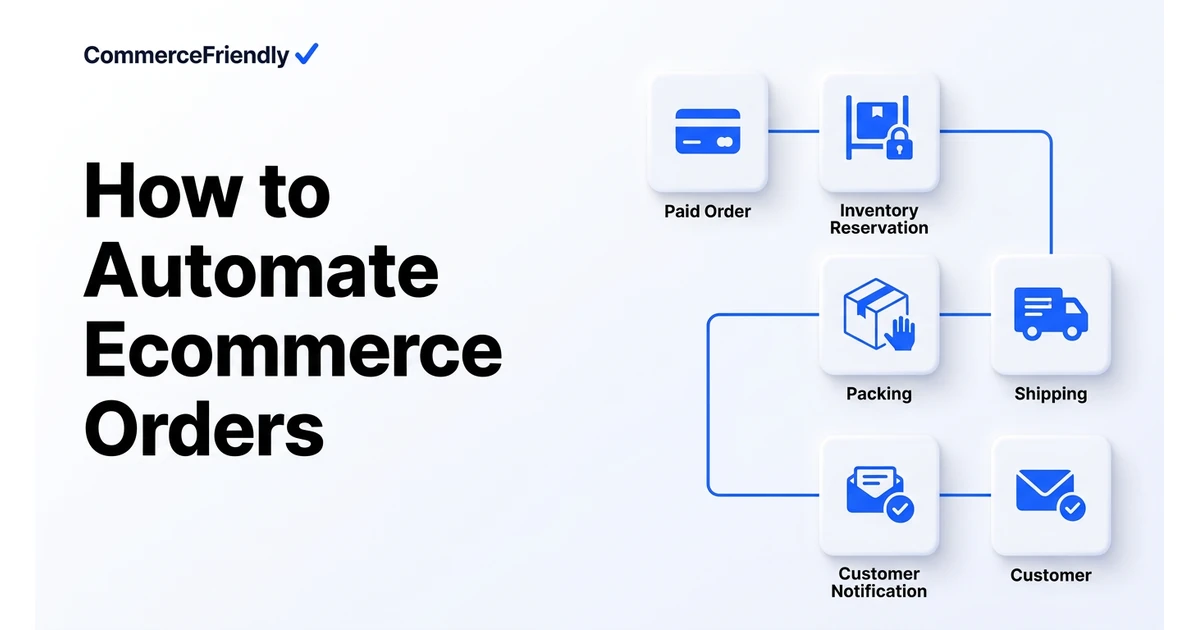
The order-to-cash chain
- Capture: payment authorised, fraud scored, address validated.
- Allocate: stock reserved from the best location, backorders flagged.
- Route: sent to warehouse, 3PL, dropship supplier or store pickup.
- Ship: label generated, packing slip printed, tracking published.
- Notify: confirmation, dispatch and delivery messages triggered by event.
- Settle: invoice issued, tax recorded, revenue and fees posted to accounting.
Automate in this order
| Step | Manual cost | Automation effort | Priority |
|---|---|---|---|
| Label and tracking | High, every order | Low | First |
| Order routing | High at multi-location | Medium | First |
| Customer notifications | Medium | Low | Second |
| Fraud and address checks | Low volume, high risk | Low | Second |
| Invoicing and accounting sync | High at month end | Medium | Third |
| Returns and refunds | High per case | Medium | Third |
Rules that keep automation safe
- Always define an exception queue: automation should escalate, never guess.
- Hold high-risk orders for review by value, mismatch or velocity rather than blocking all of them.
- Make every step idempotent so a retry cannot double-ship or double-refund.
- Log each decision with a reason so support can explain any outcome to a customer.
- Measure touchless order rate weekly. That single number tells you whether automation is working.
How much does order automation cost to set up?
Costs break into two parts: ongoing software fees for the tools involved, such as a shipping platform, fraud checker and accounting connector, and the one-off effort to configure rules that match your actual order patterns. Software fees for a small operation might total a few hundred dollars a month; the configuration work is usually measured in days rather than dollars, but it is what determines whether automation is reliable.
The payback period is usually short for the first steps: label and tracking automation alone often removes hours of manual work a week. Fraud checks and accounting sync take longer to configure correctly but prevent costlier problems, such as chargebacks or a messy month-end close.
Signs your order process needs automation
- Staff spend part of every day manually creating shipping labels one order at a time.
- Order confirmation or shipping emails go out late or get forgotten during busy periods.
- Month-end accounting reconciliation takes days because sales, fees and refunds are entered by hand.
- The same manual fraud or address check is repeated on every order regardless of actual risk.
- Order volume has grown but the ops team has not grown proportionally, and mistakes are increasing.
Order automation tooling compared
| Approach | Coverage | Setup effort | Best fit |
|---|---|---|---|
| Native platform rules (e.g. Shopify Flow) | In-store triggers and tagging | Low | Single-platform stores with simple rules |
| Generic connector (Zapier, Make) | Any two connected apps | Medium, self-maintained | Small stacks with a few point-to-point automations |
| Dedicated shipping app | Labels, tracking, rate shopping | Low | Any store shipping physical goods |
| Full setup platform | End-to-end order-to-cash across channels | Medium, configured for you | Multichannel stores wanting one coherent flow |
Why CommerceFriendly
CommerceFriendly configures the full order-to-cash chain across your channels, payment providers, carriers and accounting system, with exception handling built in from the start.
Standard orders flow from payment to accounting without a human step.
Risky, backordered or oversized orders route to a review queue with context.
Labels, duties and tax records generated correctly per destination.
Fees, refunds and settlements post to accounting automatically.
Frequently asked questions
How much does it cost to automate ecommerce orders?
Costs vary widely depending on scope. Shipping and label automation alone can be added for a small monthly app fee, while a full order-to-cash setup covering fraud checks, routing, invoicing and accounting sync typically involves both software subscriptions, often a few hundred dollars a month combined, and a one-off setup or configuration cost. The setup work is usually the larger investment, since it determines whether automation actually holds up under real order volume.
Can small ecommerce businesses automate order processing?
Yes, and it is often more valuable for small businesses than large ones because there is no spare staff time to absorb manual work. Starting with labels, tracking and notifications gives the fastest payback with the least complexity, before moving on to fraud checks and accounting sync. Most small stores can automate the core order flow without needing an in-house developer.
What is the difference between order automation and order management?
Order management is the overall process and set of tools used to handle an order from placement to completion. Order automation is the specific work of removing manual steps from that process using rules, triggers and integrations. You can have an order management system that is still mostly manual, so automation is really about how much of that system runs without a person.
What percentage of orders should be touchless?
There is no universal number, but many well-automated operations get standard, in-stock, low-risk orders to well above 90 percent touchless, reserving manual review for genuine exceptions such as fraud flags, address mismatches or backorders. Tracking this percentage weekly is more useful than aiming for a specific target, since it shows whether automation coverage is improving or slipping as order mix changes.
Is order automation safe for fraud-prone products?
Yes, provided the rules route high-risk orders to manual review rather than trying to auto-approve everything. Automation should score every order and only fast-track ones below a defined risk threshold, holding the rest for a human decision. This keeps the speed benefit for the majority of orders while still catching the cases that need judgement.
Does order automation replace the need for a fulfilment team?
No. It removes repetitive administrative steps like label creation, notifications and data entry, but picking, packing and physical shipping still need people or robotics on the warehouse floor. What automation changes is how much order volume a given team can handle without adding headcount at the same rate.
Keep reading
Automate orders, inventory, tax and marketing workflows end to end.
The full launch sequence, from product data to first paid order.
How the major platforms compare on cost, speed and scale.
When to move off Shopify and which stacks are worth evaluating.