
How to sync inventory across multiple marketplaces
Overselling costs refunds, defect rates and sometimes account suspension. Reliable sync is not one setting, it is an architecture: one master, push updates, buffers and reconciliation.
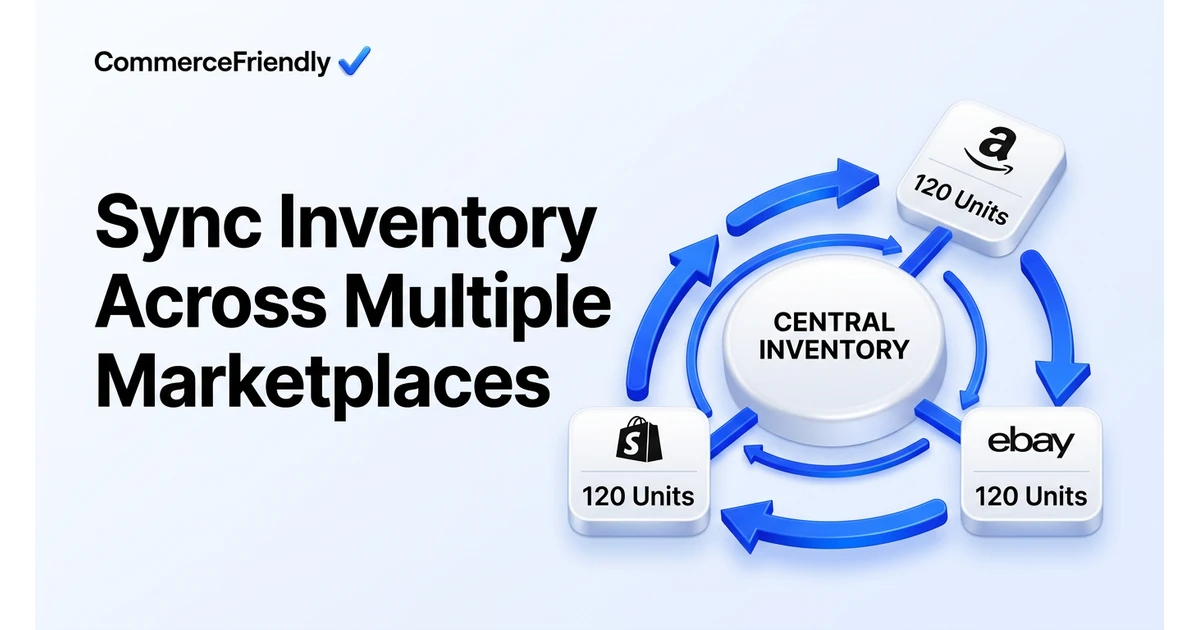
The four-part sync architecture
- Master of record: one system owns quantity. Marketplaces are followers, never sources.
- Event-driven updates: an order, return or receipt immediately triggers a push to every channel.
- Safety buffers: per-channel reserve sized by sales velocity and sync latency.
- Reconciliation: a scheduled full sync that catches anything the event stream missed.
Webhooks versus polling
| Method | Latency | Reliability | Use it for |
|---|---|---|---|
| Webhooks / notifications | Seconds | High, but events can be missed | Order created, order cancelled, refund |
| Scheduled polling | Minutes | Predictable, rate-limit bound | Backfilling and catching missed events |
| Full reconciliation | Hours | Highest accuracy | Nightly correction of every SKU |
| Manual export | Days | Low | One-off migrations only |
The reliable pattern is all three: webhooks for speed, polling as a safety net and a nightly full sync as the final authority.
Sizing safety buffers
- Slow movers, under one sale a week: buffer of zero to one unit.
- Steady sellers: buffer covering roughly one sync interval of demand.
- Hero SKUs during promotions: larger buffer, plus tighter sync frequency.
- Last-unit protection: hide a SKU on secondary channels when available-to-sell reaches one.
- Bundles and kits: recalculate component availability, not just the bundle count.
How much does inventory sync software cost?
Pricing generally scales with order volume and number of connected channels rather than SKU count alone. Lightweight apps aimed at small sellers start in the tens of dollars a month, mid-market channel managers sit in the low hundreds, and enterprise-grade platforms with dedicated onboarding move into thousands per month plus implementation fees.
The real cost comparison is not tool price against tool price. It is tool price against the cost of oversells: refunds, negative feedback, and in the worst case a marketplace suspension. A modest monthly fee that removes a recurring source of manual firefighting usually pays for itself within the first month for anyone selling on more than two channels.
Common mistakes that cause inventory drift
- Treating every channel as a source of truth instead of a follower of one master system.
- Setting a single global buffer instead of sizing it per SKU and per channel based on velocity.
- Forgetting bundles and kits, so a component sells out while the bundle still shows in stock.
- No reconciliation job, so a missed webhook silently drifts for days before anyone notices.
- Manual stock adjustments made directly on a marketplace dashboard that never make it back to the master system.
How to choose a sync tool for your channel mix
The right choice depends heavily on how many channels you run and how much of your stack is already connected. A seller on one platform managing multiple stores needs different tooling to sync inventory across multiple marketplaces than a seller running Amazon, eBay and a Shopify storefront side by side.
| Setup | Typical need | Good fit |
|---|---|---|
| Two channels, low volume | Simple two-way sync app | Native marketplace app or lightweight connector |
| Three or more marketplaces | Central hub with per-channel rules | Dedicated channel manager or configured setup platform |
| Multiple warehouses or 3PLs | Location-aware allocation, not just sync | Platform that handles both inventory and order routing together |
| High SKU count with bundles | Component-aware stock logic | Tooling that explicitly supports kits and multipacks |
Why CommerceFriendly
CommerceFriendly configures the full sync architecture across your marketplaces, including event handling, buffers, kit logic and nightly reconciliation, so oversells stop being part of your weekly routine.
Events push stock changes to every marketplace within seconds of an order.
Reserve levels are calculated per SKU and per channel, not set as one blanket number.
A full comparison catches drift before it reaches a customer.
Kits, multipacks and components stay consistent across channels.
Frequently asked questions
How much does inventory sync software cost?
Standalone sync tools typically run from around $30 a month for a couple of channels and a few hundred SKUs, up to several hundred a month for higher order volumes and more marketplaces. Enterprise channel managers can run into the thousands. The bigger cost is usually setup time: mapping SKUs, agreeing a master system and testing buffers properly, which a tool subscription alone does not solve.
Can I sync inventory without a third-party app?
Yes, if you are willing to build against each marketplace API directly and maintain the code as those APIs change. Most teams find this only makes sense past a certain order volume, since it is genuine engineering work. Below that point, a dedicated sync tool or a broader setup platform is cheaper than the ongoing maintenance.
What is the difference between inventory sync and inventory management?
Sync is the mechanism that keeps a quantity consistent across channels; management is the broader discipline of forecasting demand, setting reorder points and deciding allocation between locations. You can have accurate sync with poor management, and you will still stock out or overstock. The two need to work together, with sync as the plumbing underneath the decisions.
How often should inventory sync run?
Event-driven updates should fire within seconds of anything that changes quantity: an order, a return, a manual adjustment. Alongside that, a full reconciliation once or twice a day catches anything the event stream missed. Polling every few minutes as a backstop is reasonable if webhooks are not fully reliable on a given channel.
Does Shopify sync inventory automatically with Amazon and eBay?
Not natively. Shopify tracks stock for its own storefront and POS locations, but pushing and pulling quantities with Amazon, eBay or Walmart requires an integration, either a dedicated app or a configured connection through a setup platform. Without one, each channel keeps its own separate count.
What happens if two marketplaces sell the last unit at the same time?
One order will be confirmed and the other will need to be cancelled or refunded, which is exactly what safety buffers exist to prevent. Setting even a one-unit buffer on secondary channels, or hiding a SKU once available-to-sell hits one, closes most of this window. A same-day reconciliation limits the damage on the rare occasions it still happens.
Keep reading
Automate orders, inventory, tax and marketing workflows end to end.
The full launch sequence, from product data to first paid order.
How the major platforms compare on cost, speed and scale.
When to move off Shopify and which stacks are worth evaluating.